AI Recruit Assistant
The recruiting platform for college athletic departments. Each coach's board, recruit history and follow-ups live in one place, and the athletic department gets one view of recruiting across its programs. Every recruit hears back, and every conversation is remembered.
Recruiting rarely lives in one place
The board is a spreadsheet, the call notes are in a notebook or a phone, the email thread is in an inbox, the camp roster is on paper and the recruiting service's list is in another file. A coach working a hundred or more recruits is holding all of those relationships in their head: who said what, what was promised and how long it has been since a top recruit last heard from the program. A recruit can tell the difference between a program that remembers the last conversation and one that starts over.
Say what happened. Confirm it. It is filed.
A coach should not have to stop and fill out a form to keep a recruit's record straight.
The coach says what happened
A coach can type or say, “Talked to Maya's mom, she is visiting Friday, remind me Thursday to send the schedule.” The assistant shows what it understood before anything is saved.
One click confirms it
The coach confirms with one click, and the call, the visit and the reminder are filed on the right recruit. Each contact builds that recruit's history, so the coach opens the next conversation knowing where the last one left off.
No top recruit goes quiet
Any top recruit who goes two weeks without contact shows up on the coach's list to reach that week.
Real screens from the working platform
These are screens from AI Recruit Assistant running today, shown with a demo team and made-up recruits.
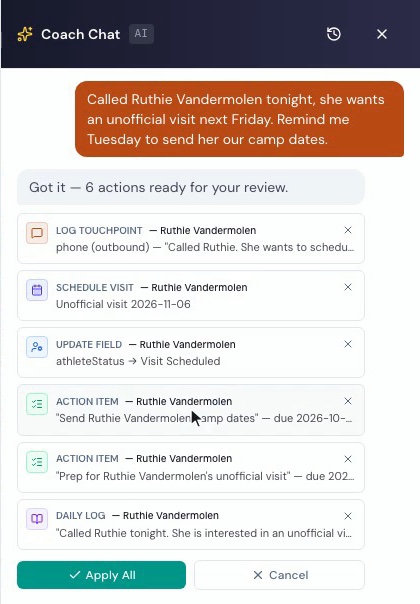
One sentence becomes the whole record
The coach typed one sentence about a phone call. The assistant drafted the call log, the visit, the reminders and the daily log entry, and nothing saves until the coach approves it.

A board for every program
Each card shows a recruit's class, position and tier, with top recruits first. Team sports, like basketball here, group recruits by position.

Boards take the shape of the sport
Golf, tennis and bowling rank by scoring average, UTR or bowling average, and track and cross country go by event. A coach can mark a number Verified when it comes from an official source.
Built around how coaches recruit
One platform for the whole department, set up with each coach's own recruits.
Email From the Coach's Own Address
Coaches can send recruiting email from their own university address inside the platform, and the copy files itself on the recruit's page.
The Coach's Own List, Loaded
WiscAI loads a coach's existing spreadsheet or export on request, so a board starts with the coach's own recruits.
One View for the Athletic Department
The athletic department sees each program's recruiting class against its target, across every program.
Built to Reach Admissions
AI Recruit Assistant is built to send recruiting updates to a university's admissions system as a scheduled file.
Coaches Decide What Comes Next
Coaches help decide what gets built next in regular reviews with the WiscAI team.
Ready for Your IT Office
WiscAI completes the HECVAT, the security questionnaire higher education uses, and answers your IT office's questions directly.
Every recruit is a prospective student
The coach is often the first person at the university a recruit gets to know, and every recruit a coach is working is a prospective student. At Edgewood University, more than 95 of the 285 first-year students who started in fall 2026, the university's largest incoming class in more than ten years, are student-athletes.
AI Recruit Assistant shows the athletic department each program's recruiting class against its target.
Adopted by Edgewood University Athletics
Edgewood University's Department of Athletics adopted AI Recruit Assistant for all of its varsity programs. The rollout began with a men's lacrosse pilot in June 2026, opened to the department's first coaches in August and opened to every program that fall.
The short answers
Is it only for Division III?
No. AI Recruit Assistant is designed for college athletic departments at every level.
How long until our coaches are on it?
A program can start as soon as its coaches have logins, and WiscAI loads each coach's existing list on request. At Edgewood University the rollout began with a men's lacrosse pilot in June 2026, opened to the department's first coaches in August and opened to every program that fall.
What happens to the spreadsheets our coaches already keep?
WiscAI loads a coach's existing spreadsheet or export on request, so a board starts with the coach's own recruits.
Does it work with our admissions system?
AI Recruit Assistant is built to send recruiting updates to a university's admissions system as a scheduled file. Tell us which system you run and we will walk through how it connects with your admissions office.
Will our IT office need a security review?
Most do. WiscAI completes the HECVAT, the security questionnaire higher education uses, and answers your IT office's questions directly.
What does it cost?
It depends on the size of your department. Tell us about your programs below and we will talk it through.
Who builds it?
WiscAI, an AI consulting and development firm in Madison, Wisconsin. We sit down with the coaches, hear what they need and build it with them.
For your IT office: the AI Recruit Assistant privacy policy is at airecruitassistant.com/privacy.
Ask for a walkthrough
Tell us about your department and we will show you AI Recruit Assistant with your sports. We usually answer within a day.